PangoBooks: Buy & Sell Books
Pangobooks IncShopping
4.71.44K Reviews
- Version
- 3.0.39
- Installs
- 100.00K
- Age Rating
- Everyone
Screenshots

Our Review of PangoBooks: Buy & Sell Books
 Analysis by Appyee
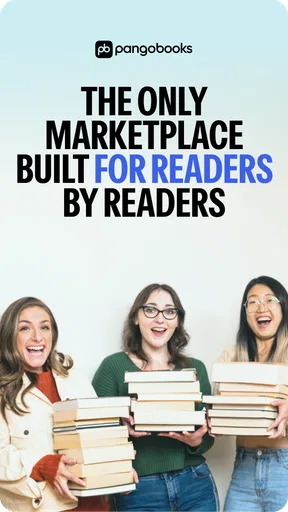
I like book marketplaces that feel built around readers rather than anonymous listings, and PangoBooks takes that approach more clearly than a general shopping app. It is a free shopping app from Pangobooks Inc. where people can list books they own and browse books offered by other readers. In my experience, its appeal comes from combining a personal bookshelf feel with the practical goal of finding used books at attractive prices.
That combination also changes how I judge it. Buying a book from another reader is more personal than ordering a new copy from a major retailer, so trust, clear choices, and careful checking matter as much as the search itself. I found the app most useful when I treated it as a community marketplace rather than an instant-buy catalog. You can discover titles that are easy to miss elsewhere, but you also need to pay attention to listing details, seller communication, and the condition described.
The app has earned a 4.7 average from around 3.9 thousand ratings, with more than a thousand written reviews and over 100 thousand installs. Those figures suggest that it has found a real audience, although they should not replace your own judgment about a particular seller or listing. It is rated for Everyone, and the current release is version 3.0.39, compatible with Android 6.0 and later.
How PangoBooks feels when you use it
I find the app most useful when I treat it as a place to make deliberate book decisions, not just browse until something catches my eye. A small routine—deciding what I need, checking the copy, then reviewing the total cost—helps keep discovery enjoyable without turning every appealing listing into an impulse buy. That approach also makes it easier to see which habits are worth keeping as I use it more often.
A marketplace designed around book discovery
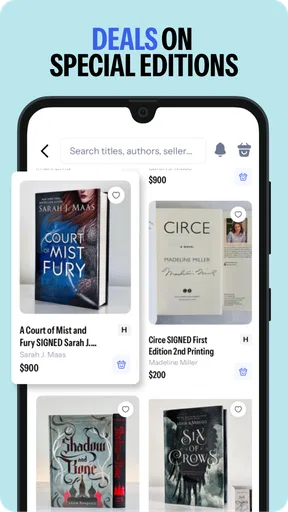
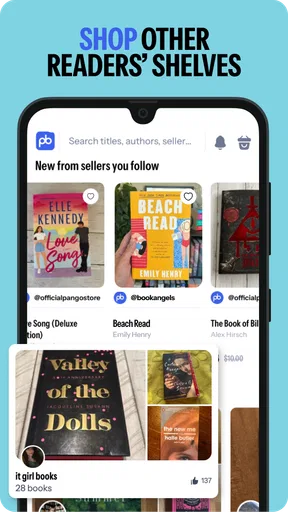
The first thing I noticed is that the app makes browsing feel closer to looking through another reader’s shelves than scrolling through a conventional retail department. That matters when I am not searching for one exact ISBN. I can start with a broad interest, notice an unexpected title, and then decide whether it fits what I want to read or collect.
This is particularly helpful for used books, older editions, reading challenges, and casual browsing. A large retailer is usually better when I know the exact edition I need and want predictable fulfillment. PangoBooks is more interesting when I am willing to compare copies and explore what individual sellers have available.
The distinction is important for students and collectors. Someone who needs a specific textbook edition by tomorrow should probably begin with a retailer or a specialist book source that makes edition matching and delivery timing the central experience. Someone building a home library, replacing a favorite paperback, or looking for inexpensive leisure reading may get more value from the reader-to-reader format.
Buying without losing sight of the details
My best habit with this app is to slow down before committing to a purchase. I check the title, author, edition information, cover image, and the seller’s condition description together instead of relying on the cover alone. A familiar cover can hide meaningful differences between editions, especially with novels that have been reprinted many times or nonfiction books that have updated content.
That extra check is one of the app’s practical trade-offs. The marketplace can surface good deals, but the deal is only good if the copy matches what you actually need. For a casual reader, a different cover or older printing may be perfectly acceptable. For a student, collector, or gift buyer, those details can be decisive.
I also recommend deciding your acceptable condition before browsing. If I am buying a book for a quick read, visible wear may not bother me. If I am replacing a sentimental copy, I look more carefully at photographs and descriptions. This simple rule prevents the excitement of a low price from overpowering the reason I wanted the book in the first place.
A realistic everyday use case
Imagine that I am preparing a small summer reading list and want several novels without paying new-book prices. I can search for the titles, compare the copies that appear, inspect the condition notes, and choose listings that fit my budget and expectations. If one title is unavailable, browsing related listings may reveal another edition or a seller with a broader selection.
After receiving the books, I would keep the listing details in mind while checking the package. I would look at whether the copy corresponds to the description and whether any significant wear was visible or clearly explained. That is not unnecessary caution; it is the normal discipline of buying from a marketplace where each listing is tied to an individual reader rather than a uniform warehouse process.
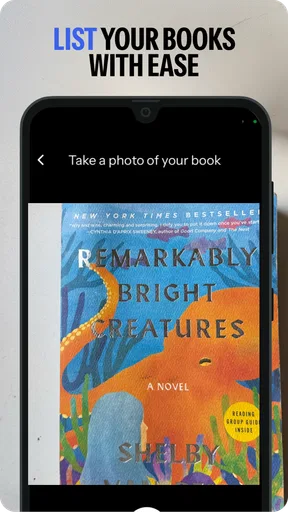
The same workflow works in reverse if I want to sell books. Instead of leaving unwanted titles in a box, I can photograph them, describe their condition honestly, and decide whether the effort of listing and handling them is worthwhile. The app is most attractive here when I have several books that still have an audience, not when I want to dispose of damaged or extremely common copies with minimal effort.
What selling requires from you
Selling sounds simple, but the quality of the listing determines how smoothly the transaction feels. I would use clear photos, mention markings or creases, and identify the edition as carefully as possible. A vague description may attract interest, but it also creates uncertainty for the buyer and increases the chance of disagreement later.
One useful strategy is to prepare listings in batches. If I have a shelf of books to move, I can photograph them in the same session, keep notes about condition nearby, and review each title before posting. This is less glamorous than browsing, but it turns the app into a practical decluttering tool rather than a place where half-finished listings accumulate.
I would also separate emotional value from resale value. A book that mattered to me may not be rare or especially desirable to another reader. Pricing and presentation should reflect the actual copy and its condition, not the memories attached to it. That mindset makes the selling experience more realistic and helps avoid disappointment.
Trust starts with visible choices
Because this is a shopping app involving accounts, listings, and transactions, I pay attention to what I am being asked to do at each stage. I prefer apps that let me make deliberate choices instead of pushing me through a vague or overly automatic process. With PangoBooks, I would review account prompts, listing information, and purchase details before confirming anything.
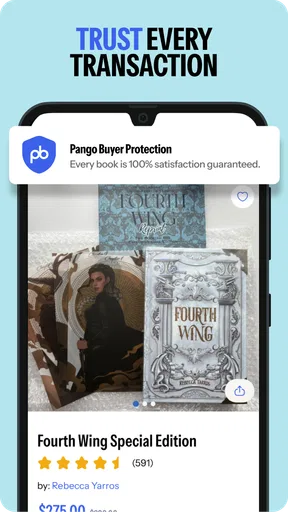
I do not treat a strong average rating as a guarantee that every interaction will be perfect. Ratings describe the broader experience, while trust is built one listing and one seller at a time. A careful buyer should still read the available information, keep communication relevant to the transaction, and avoid making decisions solely because a listing looks unusually cheap.
The same principle applies to selling. I would avoid putting unnecessary personal information in a public book description. A listing needs useful details about the item, not a biography of the seller. Keeping the public-facing content focused on the book gives buyers what they need while preserving a sensible boundary around personal details.
Account control and user agency
I value being able to decide how much I participate. A reader may want to browse occasionally, while another person may use the app to manage a substantial personal inventory. Those are different patterns, and the app makes more sense when I choose my level of involvement rather than feeling obligated to become a full-time seller.
Before creating listings, I would consider whether I am ready to keep them accurate. If a book sells elsewhere, the listing needs attention. If its condition changes or I discover a missing page, the description should reflect that. User control is not only about buttons and settings; it is also about having enough information to maintain an honest marketplace presence.
When buying, I would keep my search focused and avoid impulse purchases simply because the app makes discovery enjoyable. A reader-friendly marketplace can encourage browsing, and browsing can quickly turn into a growing pile of books. Setting a short list before opening the app is a surprisingly effective way to preserve the savings that attracted me in the first place.
Data-sensitive moments deserve attention
Any app connected to shopping and accounts deserves a quick privacy check before regular use. I would read the permissions and data choices presented during installation and account setup, then revisit the app’s privacy controls if they are available. I would not grant access automatically just because a prompt appears; I would consider whether the requested access is relevant to the action I am trying to complete.
Photos are a good example of a moment that calls for care. A seller may need to show a book’s condition, but the image should contain the book and its relevant details rather than unrelated documents, labels, or personal surroundings. Cropping the frame and checking the background before uploading is a small step that reduces accidental exposure.
Messages and profile information deserve the same restraint. I would keep conversations about the title, condition, shipping, and transaction itself. If another user asks for details that are unrelated to the sale, I would pause rather than share them automatically. The app can support a marketplace interaction without becoming a reason to disclose more about myself than necessary.
On a shared phone, I would also pay attention to account access and notification previews. A shopping notification can reveal that I bought or sold something, which may be harmless in one household and private in another. Reviewing device-level notification settings is a useful complement to whatever controls the app provides.
Where the experience can be frustrating
The biggest limitation is the natural inconsistency of a reader-to-reader marketplace. Inventory depends on what people choose to list, so the exact copy I want may not appear when I search. Even when it does, condition, edition, and seller responsiveness can vary. That uncertainty is part of the app’s character, but it makes the experience less predictable than buying new from a large retailer.
There is also a time cost. Finding a bargain may require comparing several listings rather than selecting the first result. Sellers need to take photographs and write accurate descriptions, and buyers need to read them. If I value speed above discovery, this process may feel like work.
Shipping can make a low sticker price less impressive as well. I would judge the total purchase rather than the book price alone and compare several listings when practical. A slightly more expensive copy may be the better choice if its condition is clearer, the edition is right, or the overall transaction feels more dependable.
Another limitation is that the app is not a substitute for a library. If my priority is borrowing, returning, and avoiding ownership altogether, a library app or local library service is a better fit. PangoBooks is aimed at buying and selling books, so its value is strongest when I want to own a copy or recover some value from books I already have.
Who should use it, and who should skip it
I would recommend PangoBooks to readers who enjoy used books, like browsing beyond exact searches, and are comfortable making informed decisions about condition. It is also a sensible option for people who have readable books at home and want a focused place to offer them to other readers rather than using a broad classifieds platform.
It suits collectors when they are prepared to verify editions carefully. The app can help locate interesting copies, but a collector should not assume that a familiar title automatically means the desired printing. Checking identifying details remains essential.
I would be more cautious recommending it to someone who needs guaranteed uniformity, immediate delivery, or a precise academic edition. In those cases, a specialist bookseller, campus bookstore, library service, or large retailer may reduce the uncertainty. I would also steer away from it if I disliked photographing items, answering buyer questions, or handling the small responsibilities that come with peer-to-peer selling.
How it compares with familiar alternatives
Compared with a general marketplace, PangoBooks feels more focused because the entire experience is centered on books and readers. That focus can make discovery more relevant and listings easier to understand. A general marketplace may offer a larger variety of goods, but that breadth can also mean more noise and less context around a book’s edition or condition.
Compared with buying new from a major retailer, PangoBooks offers the possibility of lower-cost used copies and more personal discovery. The trade-off is that copies are not necessarily standardized, and the purchasing experience depends more on the individual listing. I would choose the retailer for speed and predictability, and this app for value, browsing, and the chance to find a copy with character.
Compared with borrowing from a library, the difference is ownership. A library is usually the better answer for reading widely without building a collection. PangoBooks is better when I want to keep the book, resell it later, annotate it, or find a title that I would like to revisit.
My practical routine for safer, smarter use
I would begin by deciding whether I am buying for reading, collecting, gifting, or study. That purpose determines how strict I need to be about condition and edition. I would then compare multiple listings, read descriptions completely, inspect every available image, and consider the total cost before purchasing.
For selling, I would clean the book gently, photograph the cover and any meaningful flaws, and write the condition in plain language. I would avoid promising perfection and would mention markings, bends, inscriptions, or missing supplementary material when relevant. Honest detail is not just courteous; it is the best way to attract the right buyer.
For account and privacy choices, I would review permissions instead of accepting them reflexively, keep uploaded images limited to what the listing needs, and avoid sharing personal information in descriptions or messages. These habits do not make the marketplace risk-free, but they give me more control over what I reveal and how I participate.
My cautious verdict
PangoBooks is a convincing choice for readers who want a book-specific marketplace with a more personal feel than ordinary online shopping. I enjoy the possibility of finding affordable copies, discovering titles through other readers’ shelves, and turning books I no longer need into something useful for someone else. Its free price and Everyone rating also make it easy to try without a financial commitment to the app itself.
Still, I would not use it on autopilot. The strongest results come from checking editions, reading condition notes, comparing the full cost, and treating seller interactions thoughtfully. The app does not remove the judgment required in secondhand shopping; it gives that judgment a focused place to happen.
My recommendation is therefore positive but deliberate: install it if you enjoy used books and are willing to inspect listings carefully. Skip it when your priority is instant, standardized fulfillment or borrowing rather than buying. For the right reader, the real strength is the balance between book discovery and direct user choice, provided that trust is built through careful decisions rather than assumed from the marketplace format alone.
Verdict
Strengths of PangoBooks: Buy & Sell Books
- Easy way to discover and buy used books from independent sellers.
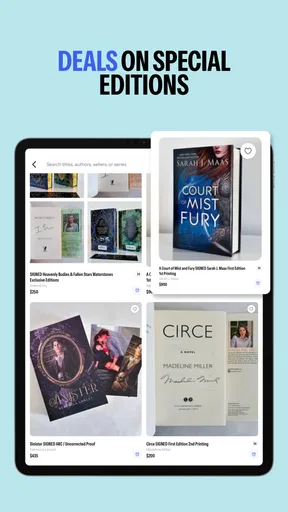
- Book listings often include photos, descriptions, and condition details.
- Supports selling books directly without setting up a personal storefront.
- Social features make it easy to follow readers and find recommendations.
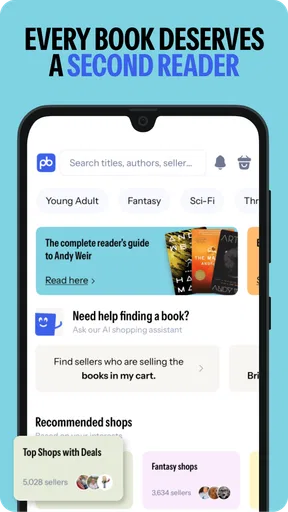
- Useful search tools help narrow results by title, author, or genre.
Limitations of PangoBooks: Buy & Sell Books
- Inventory depends on individual sellers, so popular titles may sell quickly.
- Book condition can vary despite listing descriptions and photos.
- Shipping costs may reduce the savings on inexpensive books.
- Seller response times and shipping speed can be inconsistent.
- Some features may feel limited compared with larger book marketplaces.
Similar Picks in This Category
View All
SHEIN-Shopping Online
Roadget Business PTE. LTD.4.8

Amazon Shopping
Amazon Mobile LLC4.4


Mercado Libre: Compras online
Mercado Libre4.8

Wish: Shop and Save
Wish US Holdings LLC4.7

Alibaba.com - B2B marketplace
Alibaba Mobile4.4
Frequently Asked Questions
What is PangoBooks: Buy & Sell Books?
PangoBooks is a marketplace app designed for buying and selling used books. You can browse listings from individual sellers, search for specific titles or genres, view photos and descriptions, and purchase books directly through the platform. Sellers can create listings, set prices, manage orders, and connect with readers looking for affordable copies of books.
How do I buy books through PangoBooks?
To buy a book, search by title, author, ISBN, category, or keyword, then open a listing to review its condition, photographs, price, seller information, and shipping details. If everything looks suitable, add the book to your cart or purchase it according to the available listing options. Always check the description carefully before completing your order.
How can I sell my used books on PangoBooks?
Selling generally involves creating an account, photographing the book, entering information such as the title and ISBN, describing its condition accurately, and setting a price. Before publishing a listing, check that the cover, edition, highlighting, writing, missing pages, or other defects are clearly disclosed. Honest descriptions can help prevent buyer complaints and returns.
Is PangoBooks safe for payments and transactions?
PangoBooks is built to organize transactions between buyers and sellers, but users should still review each listing and seller profile carefully. Use the payment and communication tools provided inside the app rather than sending money through unofficial channels. Keep records of orders, shipping information, and messages, and contact platform support if a transaction appears suspicious or does not follow the app’s policies.
What should I know about shipping, book condition, and returns?
Shipping times and costs may vary depending on the seller, destination, and order details, so review this information before purchasing. Used books can range from like-new to heavily worn, and descriptions may mention writing, highlighting, bent pages, stickers, or other flaws. If a book arrives significantly different from its listing, consult PangoBooks’ current return, refund, and dispute policies promptly.
